Most developers have used ChatGPT, Copilot, or Claude in a chat window. You type a question, get an answer, copy-paste the code into your editor, run it, hit an error, go back to the chat, paste the error, get a fix, and repeat. It works — but it’s slow, manual, and fundamentally limited by the copy-paste boundary between the LLM and your codebase.
Coding Agents are a fundamentally different paradigm. They don’t just suggest code — they write, execute, and iterate on it autonomously. The LLM is no longer an assistant you consult; it’s an agent that acts on your behalf, directly inside your development environment.
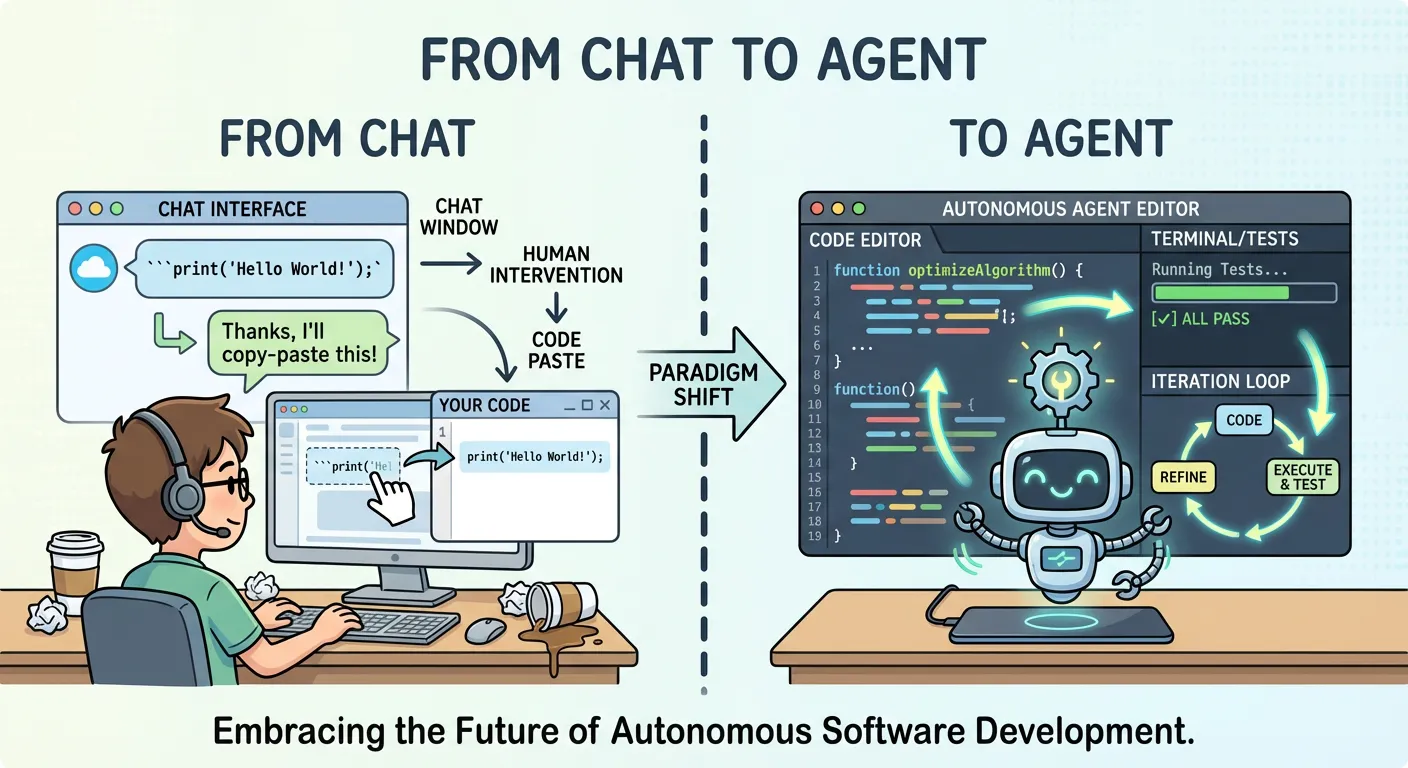
From Suggestion to Action
The key distinction is autonomy of execution. A chat-based LLM operates in a single modality: it generates text. A Coding Agent operates in a multi-modal action space:
- Read files — explore the codebase, understand project structure
- Write files — create new code, modify existing modules
- Execute commands — run tests, linters, build scripts
- Observe results — read compiler errors, test output, log files
- Iterate — adjust its approach based on feedback, without human intervention
This feedback loop — act, observe, adjust — is what makes Coding Agents qualitatively different from chat-based tools. The agent doesn’t just propose a solution; it validates the solution against the mechanical reality of your codebase — does it compile, do tests pass, do linters approve?
Why Software Development Is the Ideal Domain
Not every domain is equally suited for agentic AI. Software development happens to be exceptionally well-matched, for four structural reasons:
Text-driven: Code is text and LLMs are text models — but the real advantage isn’t just that both are text. It’s that the text representation is the deliverable: there’s no translation step between the agent’s output and the domain’s product. In code, the text is the artifact.
Clear rules: Programming languages have formal grammars. Compilers and interpreters provide unambiguous error signals. The agent always knows whether its output is valid — there’s no room for “maybe it works.”
Fast feedback loops: Write code → compile → run tests → get results. The cycle time is seconds to minutes, not hours or days. This allows the agent to iterate rapidly and converge on correct solutions.
Dogfooding effect: Developers build the tools that work in their own domain, creating a virtuous cycle of improvement.
These four properties reinforce each other — text-driven output enables mechanical validation, clear rules enable fast feedback, and fast feedback enables rapid iteration — creating a domain uniquely suited for autonomous agents.
The Landscape: Pi, OpenCode, OpenClaw, and Beyond
The Coding Agent ecosystem is growing rapidly. Throughout this series, we use Pi as our reference implementation — a minimal, open-source agent whose deliberate simplicity makes it an ideal lens for understanding the architecture. Several other open-source projects have emerged:
- Pi — A minimal, open-source Coding Agent designed as a foundation for other developments. Pi deliberately keeps its system prompt small and its default tools few, prioritizing extensibility over feature completeness. OpenClaw is built on top of Pi.
- OpenCode — Another open-source alternative with a different architectural philosophy.
- Gemini CLI — Google’s open-source CLI agent (source) for the Gemini model, providing a vendor-supported Coding Agent experience.
- Claude Code — Anthropic’s commercial Coding Agent, offering a polished but closed-source experience.
Chat LLM vs. Coding Agent: A Structural Comparison
The following table captures the fundamental differences across seven dimensions. If you’re still thinking of Coding Agents as “ChatGPT but better,” this should clarify the paradigm shift:
| Dimension | Chat-based LLM | Coding Agent |
|---|---|---|
| Output | Text suggestion | Executed action (file write, test run) |
| Feedback loop | Human reads → copies → pastes → runs → reports back | Agent reads output → iterates autonomously |
| Action space | Single-turn text generation | Multi-turn tool calls (read, write, execute, observe, iterate) |
| Context persistence | Conversation history only | Conversation + file system + shell state |
| Error recovery | Human must re-prompt | Agent reads error → adjusts → retries |
| Autonomy level | 0 (suggestion only) | 1–3 (1 = execute with approval, 2 = iterate autonomously, 3 = self-correct and extend) |
| Boundary enforcement | Not applicable (no execution capability) | Requires sandbox (Dev Container, Bubblewrap) |
The last row is critical: once an agent can execute actions, you need to think about boundaries. A chat LLM can’t delete your files — a Coding Agent can. And autonomy cuts both ways: an agent that writes code can also write bad code faster, and the feedback loop that enables iteration can amplify errors if the agent starts down the wrong path. This is why sandboxing becomes essential, and why we’ll address failure modes and best practices in later posts.
What This Means for Developers
The shift from chat to agent isn’t just a UX improvement — it changes the developer’s role. With a chat-based LLM, you are the executor: you decide what to run, when to run it, and how to integrate the result. With a Coding Agent, you become the supervisor: you define the task, set the boundaries, and review the outcome — instead of writing the authentication module yourself, you specify the requirements, let the agent implement it, and review the PR.
This is higher-leverage: you focus on architecture, requirements, and quality control. But it requires new skills — how to decompose tasks for an agent, review generated code efficiently, and set up safe execution environments.
We’ll explore all of these in the coming posts.
This is the first part of a 4-part series on Coding Agents in Practice. In the next post, we’ll open the hood and explore how Pi actually works — from System Prompts to Tools and Skills, and why the architecture of a Coding Agent matters more than the model behind it.